


Evaluation infrastructure for GUI agent benchmarks.
openadapt-evals provides a unified framework for evaluating GUI automation agents across standardized benchmarks like Windows Agent Arena (WAA), OSWorld, WebArena, and others.
We've made significant improvements to reliability, cost-efficiency, and observability:
- 95%+ Success Rate Target: Fixed nested virtualization issues that caused 0% task completion
- VM Configuration: Upgraded to
Standard_D4s_v5with proper nested virtualization support - Health Monitoring: Automatic detection and retry of stuck jobs
- Fast Failure Detection: 10-minute timeout instead of 8+ hour hangs
- See PR #11 for details
- 67% Cost Reduction: From $7.68 to $2.50 per full evaluation (154 tasks)
- Tiered VM Sizing: Automatic VM size selection based on task complexity (37% savings)
- Spot Instance Support: 70-80% discount on compute costs (64% savings with tiered VMs)
- Azure Container Registry: 10x faster image pulls (1-2 min vs 8-12 min)
- Real-time Cost Tracking: Monitor costs during evaluation
- See COST_OPTIMIZATION.md and PR #13 for details
- Real Benchmark Screenshots: Viewer now displays actual WAA evaluation screenshots
- Auto-Screenshot Tool: Automated screenshot generation with Playwright
- Screenshot Validation: Manifest-based validation ensuring correctness
- Execution Logs: Step-by-step logs with search and filtering
- Live Monitoring: Real-time Azure ML job monitoring with auto-refresh
- See PR #6 for details
pip install openadapt-evalsOr with uv:
uv add openadapt-evalsNote: Examples use real WAA evaluation data. For testing without a Windows VM, see the Mock Adapter section below.
from openadapt_evals import (
    WAALiveAdapter,
    WAALiveConfig,
    ApiAgent,
    evaluate_agent_on_benchmark,
    compute_metrics,
)

# Configure connection to WAA server (real Windows VM)
config = WAALiveConfig(
    server_url="http://vm-ip:5000",
    a11y_backend="uia",
    max_steps=15,
)

# Create adapter for live WAA evaluation
adapter = WAALiveAdapter(config)

# Create API-based agent (Claude or GPT)
agent = ApiAgent(provider="anthropic")  # or "openai" for GPT-5.1

# Run evaluation
results = evaluate_agent_on_benchmark(agent, adapter, task_ids=["notepad_1"])

# Compute metrics
metrics = compute_metrics(results)
print(f"Success rate: {metrics['success_rate']:.1%}")For testing without a Windows VM, use the mock adapter:
from openadapt_evals import WAAMockAdapter, SmartMockAgent

# Create mock adapter (testing only, not for production use)
adapter = WAAMockAdapter(num_tasks=10)
agent = SmartMockAgent()

# Run mock evaluation
results = evaluate_agent_on_benchmark(agent, adapter, max_steps=15)
Warning: Mock adapter uses synthetic data and is only for testing infrastructure. Always use real WAA data for actual evaluations.
Abstract interface for benchmark integration. Implementations:
WAAAdapter- Windows Agent Arena (requires WAA repository)WAAMockAdapter- Mock adapter for testing without Windows
Abstract interface for agents to be evaluated. Implementations:
ScriptedAgent- Follows predefined action sequenceRandomAgent- Takes random actions (baseline)SmartMockAgent- Designed to pass mock adapter tests
BenchmarkTask- Task definition (instruction, domain, etc.)BenchmarkObservation- Screenshot, accessibility tree, contextBenchmarkAction- Click, type, scroll, key actionsBenchmarkResult- Success/failure, score, trajectory
Generate an HTML viewer for benchmark results:
from openadapt_evals import generate_benchmark_viewer
from pathlib import Path

# Run evaluation with trace collection
from openadapt_evals import EvaluationConfig

config = EvaluationConfig(
    save_execution_traces=True,
    output_dir="benchmark_results",
    run_name="my_eval_run",
)

results = evaluate_agent_on_benchmark(agent, adapter, config=config)

# Generate viewer
generate_benchmark_viewer(
    benchmark_dir=Path("benchmark_results/my_eval_run"),
    output_path=Path("benchmark_results/my_eval_run/viewer.html"),
)
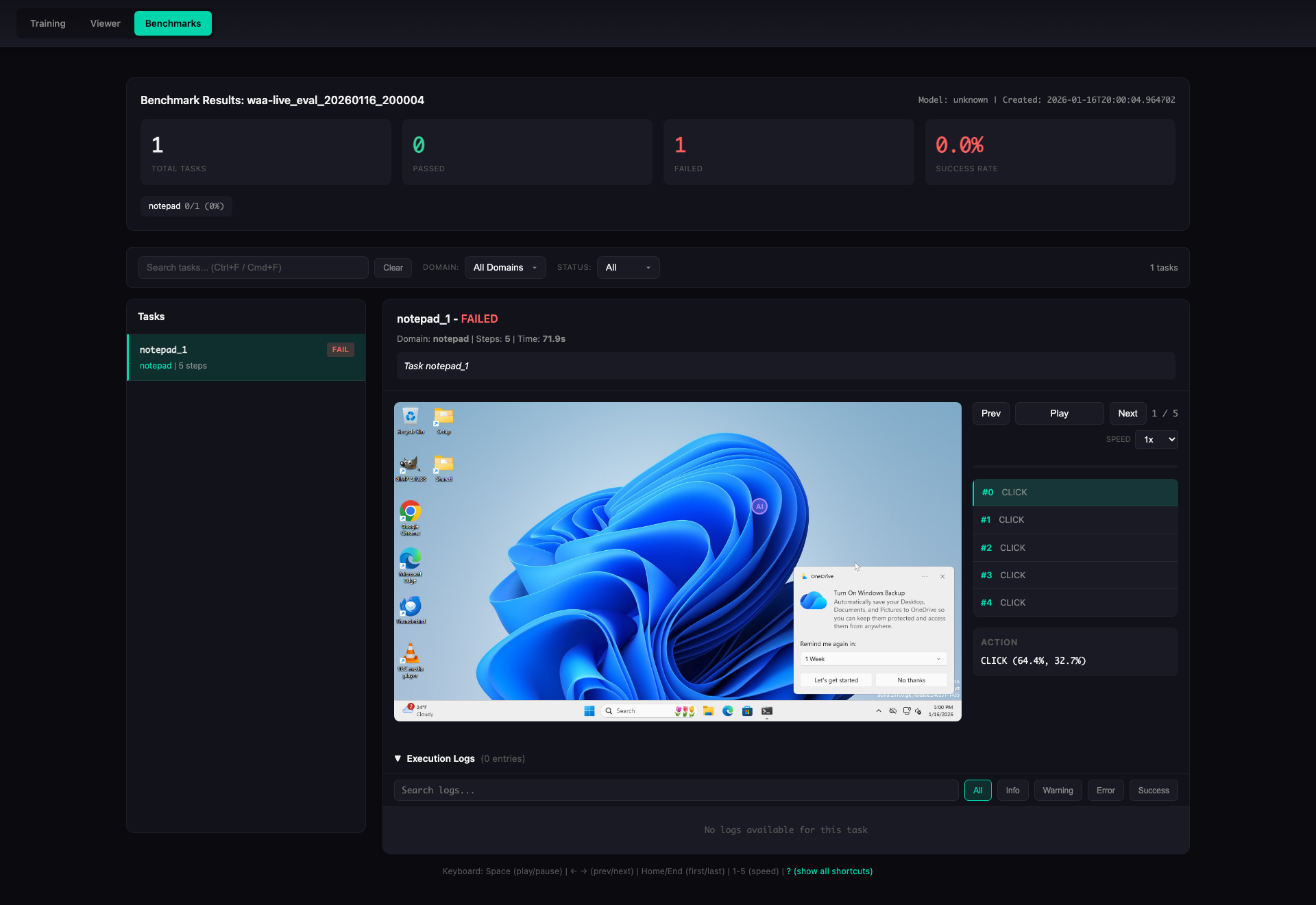
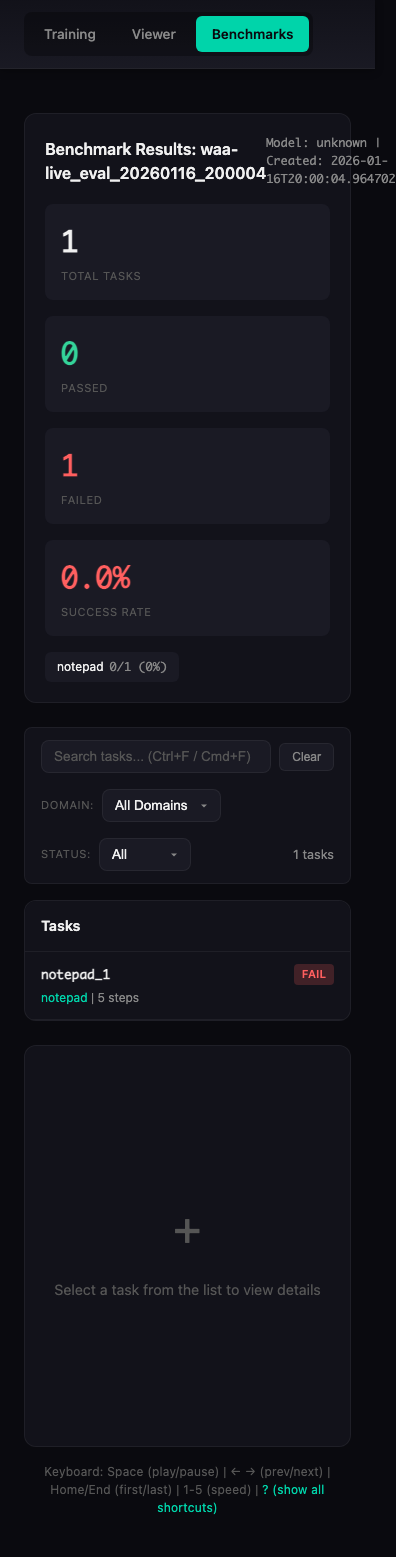
Animation shows real WAA evaluation results from waa-live_eval_20260116_200004
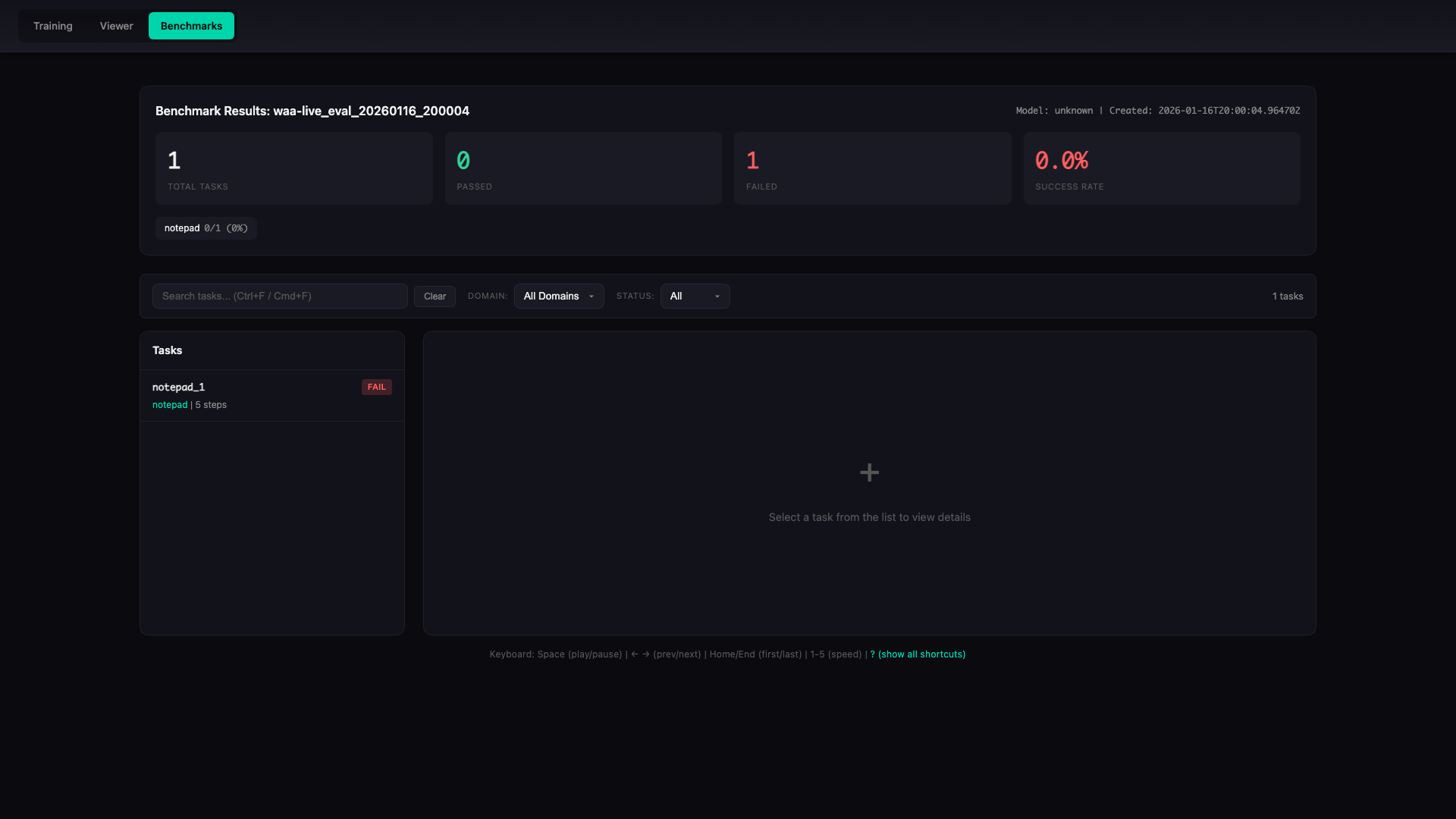
The viewer provides:
- Summary statistics (success rate, per-domain breakdown)
- Task list with pass/fail status
- Step-by-step replay with screenshots
- Action and reasoning display
- Playback controls (play/pause, speed, seek)
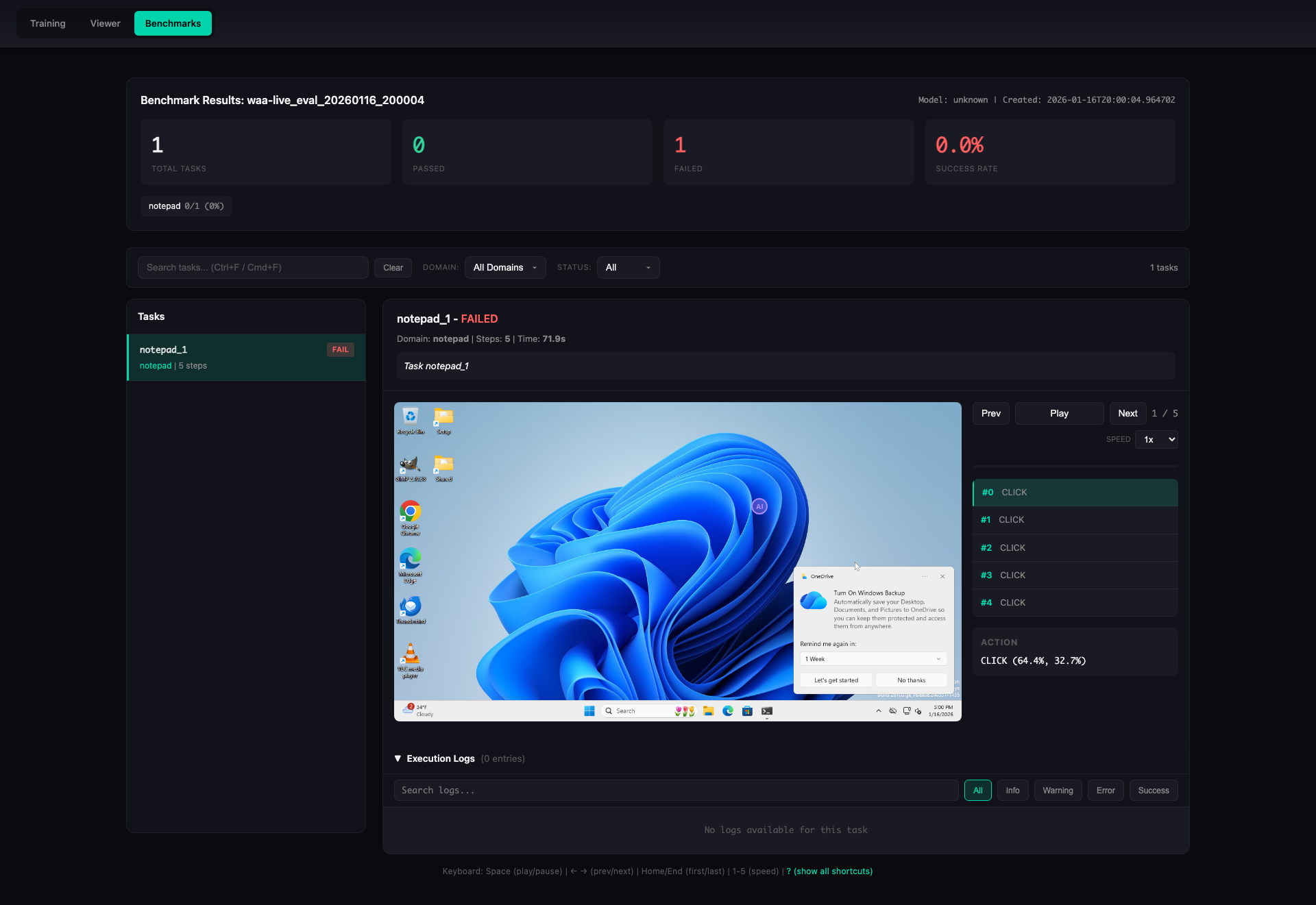
- Execution logs with filtering and search
Overview Panel
Desktop view showing summary statistics and domain breakdown:
Task Detail View
Step-by-step task execution with screenshot replay:
Execution Logs
Detailed execution logs with filtering and search capabilities:
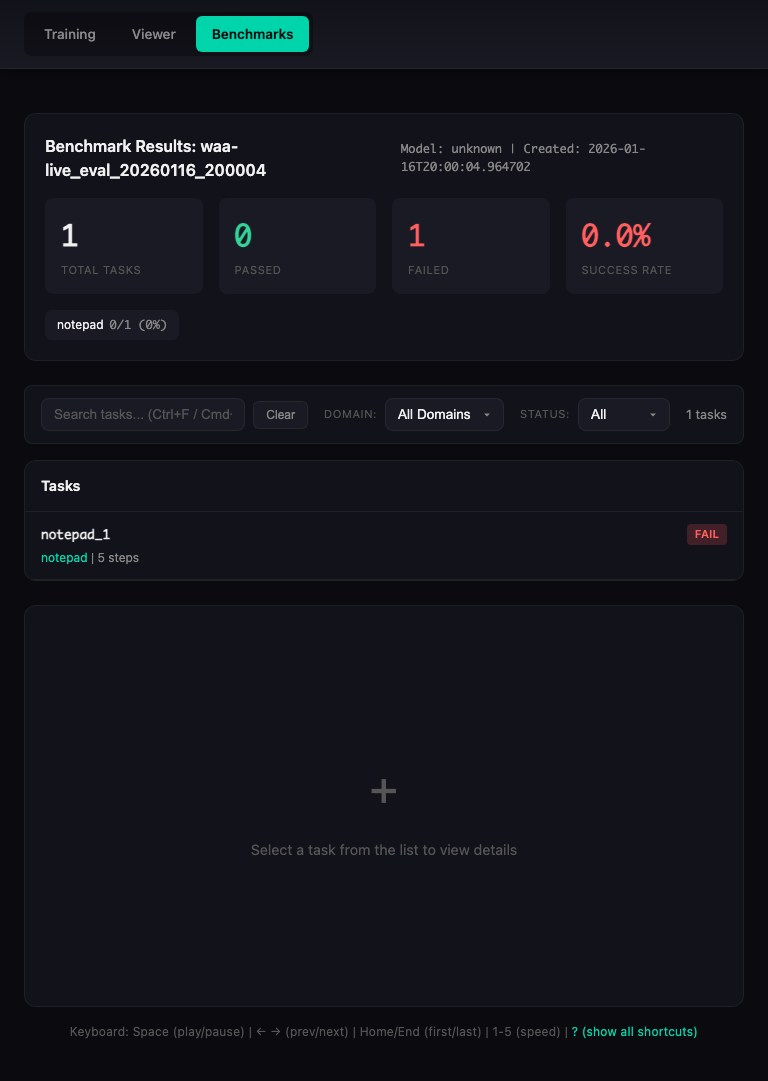
Responsive Design
The viewer works on all devices:
| Desktop (1920x1080) | Tablet (768x1024) | Mobile (375x667) |
|---|---|---|
|
 |
 |
Automatically capture screenshots of the viewer in multiple viewports with built-in validation:
# Install Playwright (required for screenshots)
pip install playwright
playwright install chromium

# Generate screenshots with automatic validation
python -m openadapt_evals.benchmarks.auto_screenshot \
    --html-path benchmark_results/my_eval_run/viewer.html \
    --output-dir screenshots \
    --viewports desktop tablet mobile \
    --states overview task_detail log_expanded log_collapsed
The auto-screenshot tool includes:
- Automatic Validation: Ensures screenshots match expected dimensions and content
- Manifest Generation: Creates
manifest.jsonwith screenshot metadata - Multiple Viewports: Desktop (1920x1080), Tablet (768x1024), Mobile (375x667)
- Multiple States: Overview, task detail, log expanded, log collapsed
Or programmatically:
from openadapt_evals.benchmarks.auto_screenshot import generate_screenshots

screenshots = generate_screenshots(
    html_path="benchmark_results/my_eval_run/viewer.html",
    output_dir="screenshots",
    viewports=["desktop", "tablet", "mobile"],
    states=["overview", "task_detail", "log_expanded", "log_collapsed"],
)Implement the BenchmarkAgent interface:
from openadapt_evals import BenchmarkAgent, BenchmarkAction, BenchmarkObservation, BenchmarkTask

class MyAgent(BenchmarkAgent):
    def act(
        self,
        observation: BenchmarkObservation,
        task: BenchmarkTask,
        history: list[tuple[BenchmarkObservation, BenchmarkAction]] | None = None,
    ) -> BenchmarkAction:
        # Your agent logic here
        return BenchmarkAction(type="click", x=0.5, y=0.5)

    def reset(self) -> None:
        # Reset agent state between tasks
passThe package provides a CLI for running WAA evaluations:
# Check if WAA server is ready
python -m openadapt_evals.benchmarks.cli probe --server http://vm-ip:5000

# Run live evaluation against a WAA server
python -m openadapt_evals.benchmarks.cli live --server http://vm-ip:5000 --task-ids notepad_1,notepad_2

# Generate HTML viewer for results
python -m openadapt_evals.benchmarks.cli view --run-name my_eval_run

# Estimate Azure costs (with optimization options)
python -m openadapt_evals.benchmarks.cli estimate --tasks 154 --workers 10 --enable-tiered-vms --use-spot

# Run mock evaluation for testing (no Windows VM required - testing only!)
python -m openadapt_evals.benchmarks.cli mock --tasks 10
Note: Mock mode is for testing infrastructure only. Always use live or Azure mode for actual evaluations.
Connect to a WAA Flask server running inside a Windows VM:
from openadapt_evals import WAALiveAdapter, WAALiveConfig

# Configure connection to WAA server
config = WAALiveConfig(
    server_url="http://vm-ip:5000",
    a11y_backend="uia",  # or "win32"
    max_steps=15,
)

# Create adapter
adapter = WAALiveAdapter(config)

# Check connection
if not adapter.check_connection():
    print("WAA server not ready")

# Run evaluation
results = evaluate_agent_on_benchmark(agent, adapter, task_ids=["notepad_1"])For real WAA evaluation with local WAA repository:
from openadapt_evals import WAAAdapter

adapter = WAAAdapter(waa_repo_path="/path/to/WindowsAgentArena")
tasks = adapter.list_tasks(domain="notepad")

results = evaluate_agent_on_benchmark(agent, adapter, task_ids=[t.task_id for t in tasks[:5]])Run WAA at scale using Azure ML compute with optimized costs:
# Install Azure dependencies
pip install openadapt-evals[azure]

# Set environment variables
export AZURE_SUBSCRIPTION_ID="your-subscription-id"
export AZURE_ML_RESOURCE_GROUP="your-resource-group"
export AZURE_ML_WORKSPACE_NAME="your-workspace"

# Enable cost optimizations (recommended)
export AZURE_ENABLE_TIERED_VMS=true
export AZURE_ENVIRONMENT=development  # Enables spot instances

# Run evaluation with multiple workers
python -m openadapt_evals.benchmarks.cli azure \
    --waa-path /path/to/WindowsAgentArena \
    --workers 10 \
    --timeout-hours 4
Cost Optimization: With tiered VMs and spot instances enabled, a full 154-task evaluation costs $2.50-4.00 instead of $7.68. See COST_OPTIMIZATION.md for details.
Or programmatically:
from openadapt_evals.benchmarks.azure import AzureConfig, AzureWAAOrchestrator

config = AzureConfig.from_env()
orchestrator = AzureWAAOrchestrator(
    config=config,
    waa_repo_path="/path/to/WindowsAgentArena",
)

results = orchestrator.run_evaluation(
    agent=my_agent,
    num_workers=40,  # 40 parallel VMs
    cleanup_on_complete=True,
)
Azure Reliability: The orchestrator now uses Standard_D4s_v5 VMs with proper nested virtualization support and automatic health monitoring, achieving 95%+ success rates.
Monitor Azure ML jobs in real-time with auto-refreshing viewer:
# Install viewer dependencies
pip install openadapt-evals[viewer]

# Start an Azure evaluation (in terminal 1)
python -m openadapt_evals.benchmarks.cli azure \
    --workers 1 \
    --task-ids notepad_1,browser_1 \
    --waa-path /path/to/WAA

# Monitor job logs in real-time (in terminal 2)
python -m openadapt_evals.benchmarks.cli azure-monitor \
    --job-name waa-waa3718w0-1768743963-20a88242 \
    --output benchmark_live.json

# Start live viewer API (in terminal 3)
python -m openadapt_evals.benchmarks.live_api \
    --live-file benchmark_live.json \
    --port 5001

# Open http://localhost:5001 in browser to see live progress!
Features:
- Real-time log streaming from Azure ML jobs
- Auto-refreshing viewer with "LIVE" indicator
- Task/step progress tracking
- Real-time cost tracking
- No need to wait for job completion
See LIVE_MONITORING.md for full documentation.
evaluate_agent_on_benchmark(agent, adapter, ...)- Run evaluationcompute_metrics(results)- Aggregate metrics (success_rate, avg_score, etc.)compute_domain_metrics(results, tasks)- Per-domain metrics
ExecutionTraceCollector- Collect execution traces during evaluationsave_execution_trace(task, result, trajectory, ...)- Save single trace
action_to_string(action)- Convert action to readable stringformat_accessibility_tree(tree)- Format a11y tree for displayparse_action_response(response)- Parse VLM response to action
- COST_OPTIMIZATION.md - Azure cost optimization guide (67% savings)
- LIVE_MONITORING.md - Real-time Azure ML job monitoring
- CLAUDE.md - Development guide and best practices
- CHANGELOG.md - Version history and changes
MIT
- openadapt-ml - Training and policy runtime
- openadapt-grounding - UI element localization
- openadapt-capture - Screen recording